
How Nigerian Brands Can Write Useful Instagram Alt Text
Useful Instagram alt text briefly describes the important visual information in an image so that people using screen readers can understand the post. For a Nigerian brand, the strongest description names the main subject, the relevant action or setting and any essential words shown in the image. It should serve the reader, not repeat the caption or carry a list of keywords.
Instagram can create automatic descriptions, but a brand can add its own alt text when posting. Menu labels can change, so use the accessibility or advanced options visible in the current app.
Alt text is not the same as a caption
A caption can tell a story, name a price, invite comments or explain how to order. Alt text explains what the image communicates. If the caption says, “Our new work tote is ready for Monday,” the alt text should not simply repeat that sentence. It could describe the tote’s shape, material, colours and how it is being shown.
Alt text is also not a hidden SEO field. Stuffing phrases such as “best bag Lagos affordable bag Nigerian bag” makes the experience worse for a screen-reader user and gives no clear picture of the image.
Describe the image’s purpose
Begin by asking why the image is in the post. Is it showing a product feature, identifying people at an event, explaining a process or presenting essential campaign text? That purpose tells you which details deserve space.
A practical order is:
- Name the main subject.
- Describe the action or position that matters.
- Add the setting when it changes the meaning.
- Include visible words only when the reader needs them.
You usually do not need to begin with “image of” or “photo of” because a screen reader already announces that an image is present. You may mention that something is an illustration, chart or screenshot when the format itself matters.

Choose details without making assumptions
Describe what is visible. Avoid guessing a person’s ethnicity, disability, mood, relationship or profession unless that information is known and relevant. “A woman smiling beside a display table” is safer than inventing her job title. Name a public person only when the account can verify the identity and the name helps the reader.
Colour can matter for fashion, food, design or a product variant. It may be unnecessary in a routine office photo. Texture, size and position can be more useful than a long list of background objects. Prefer a focused sentence or two over an inventory of everything in the frame.
A worked product-photo example
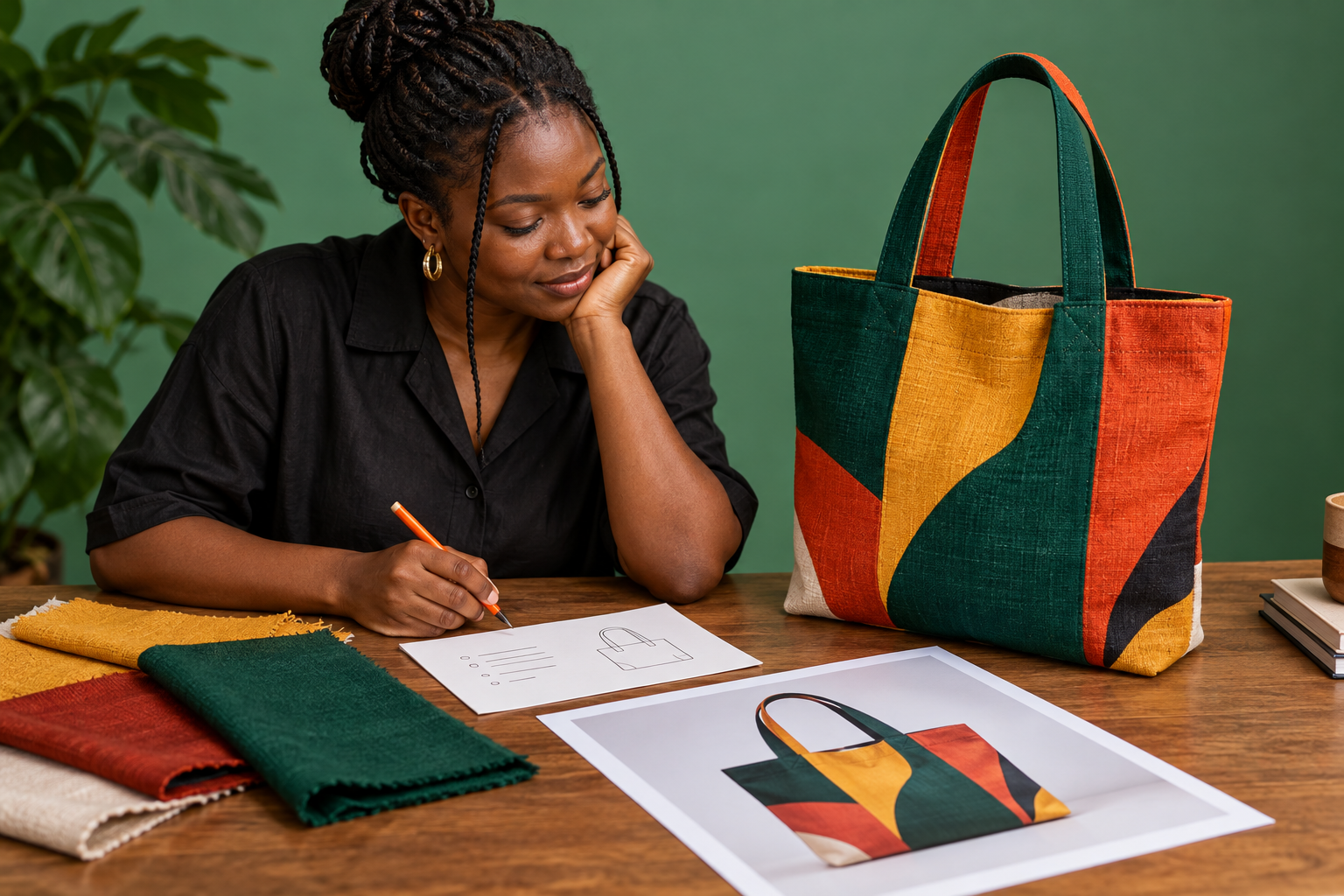
Imagine a post showing a structured tote made with dark green, orange and mustard fabric. It stands upright on a wooden table, with a close view of two handles and the patchwork front panel.
Too vague: “Beautiful new bag.”
Too promotional: “Best premium tote bag in Nigeria, buy now, affordable and stylish.”
More useful: “Structured fabric tote with dark green handles and orange, mustard and green patchwork panels, standing upright on a wooden table.”
The useful version does not claim quality the image cannot prove. It gives enough detail to understand the design. The caption can separately provide the bag name, price, stock information and ordering instructions.
Handle words inside an image carefully
If an image contains essential words, include their meaning. A sale poster that says “Pop-up shop, Saturday 7 November, 12 noon, Ikeja” needs those details in accessible text. You can place them in the caption and use alt text to describe the visual arrangement, provided the complete information remains easy to find.
Do not transcribe decorative words that add nothing. For a dense infographic, put the full information in the caption or a linked accessible page rather than forcing a long block into alt text.
Write each carousel slide separately
A carousel is a sequence of images. Give each slide its own description instead of pasting the same sentence into every field. A product carousel might move from a full view to a close-up of stitching and then to the interior compartments. Describe that progression:
- Slide 1: full view of the tote standing on a table.
- Slide 2: close-up of the reinforced handle stitching.
- Slide 3: open tote showing one zipped pocket and two small compartments.
Refer to the slide number only when it helps someone follow the sequence. Each description should still make sense on its own.
Add alt text in the current Instagram interface
When preparing an image post, continue to the final editing screen and look for the current accessibility, advanced or “more options” area. Choose the control for writing alt text, add a description for each image and save it before publishing. Existing posts may also offer an edit route.
Instagram changes labels and menu positions. Do not train a team from an old screenshot alone. Verify the route on the current app version and keep the writing guidance separate from the button names.
Review the description before publishing
Read the alt text without looking at the image. Ask whether a listener would understand the subject and the detail that matters. Remove sales language, repeated caption text and unverified assumptions. For an important campaign, invite a screen-reader user or accessibility reviewer to test the post and pay them for professional review work.
Accessible content and promotion have different jobs. Alt text helps people understand an image; bought engagement does not replace accessibility or create customer intent. Once the post is clear and ready, you can review the available Cloutingo services, read the current terms and open an account if a relevant service matches the campaign.