

How Nigerian Service Businesses Can Choose Three Instagram Posts to Pin
A Nigerian service business should use its three Instagram pinned posts for three different jobs: explain what the business does, show credible proof or the service process, and give a current next step. These posts sit at the top of the profile grid, so they should answer a new visitor’s first questions rather than simply display the three posts with the most likes.
Instagram’s current Help Centre says you can pin up to three posts to the top of your profile. The feature is available in the mobile apps, not on computers. Pinning changes where a post appears on your profile; it does not republish the post or guarantee extra reach.
Treat the pinned row as a short introduction
A visitor may arrive after seeing a Reel, receiving a recommendation or searching for a local service. They may know nothing about the business. The pinned row should reduce that uncertainty quickly.
This is different from the bio and Story Highlights. The bio is a short identity statement. Highlights organise saved Stories. Pinned posts are complete feed posts that can combine a strong visual, a detailed caption and existing comments.
Give each of the three posts one role
Post 1: orientation
Choose a post that tells a suitable visitor what you do and who the service is for. A salon might pin a short studio tour or an introduction to its main hair services. A consultant might pin a clear explanation of the problem they help clients solve.
Keep it specific. “Welcome to our page” gives less information than “Protective styling and natural-hair consultations in Abuja, by appointment.” Only make location, availability and qualification claims that are current and accurate.
Post 2: proof or process
Select evidence that helps a visitor judge the work. This could be a documented process, a portfolio example used with permission, a before-and-after pair that is honest and comparable, or a demonstration of how the service is delivered.
Avoid inventing a testimonial or pinning an old result that no longer represents the current team. If a customer appears, confirm that the business has permission to use the image and statement.
Post 3: the next step
Use the final position for a current action: how to book, what information to send, the date of an upcoming consultation day or a clear explanation of the enquiry process. The action should match what the business can actually handle.
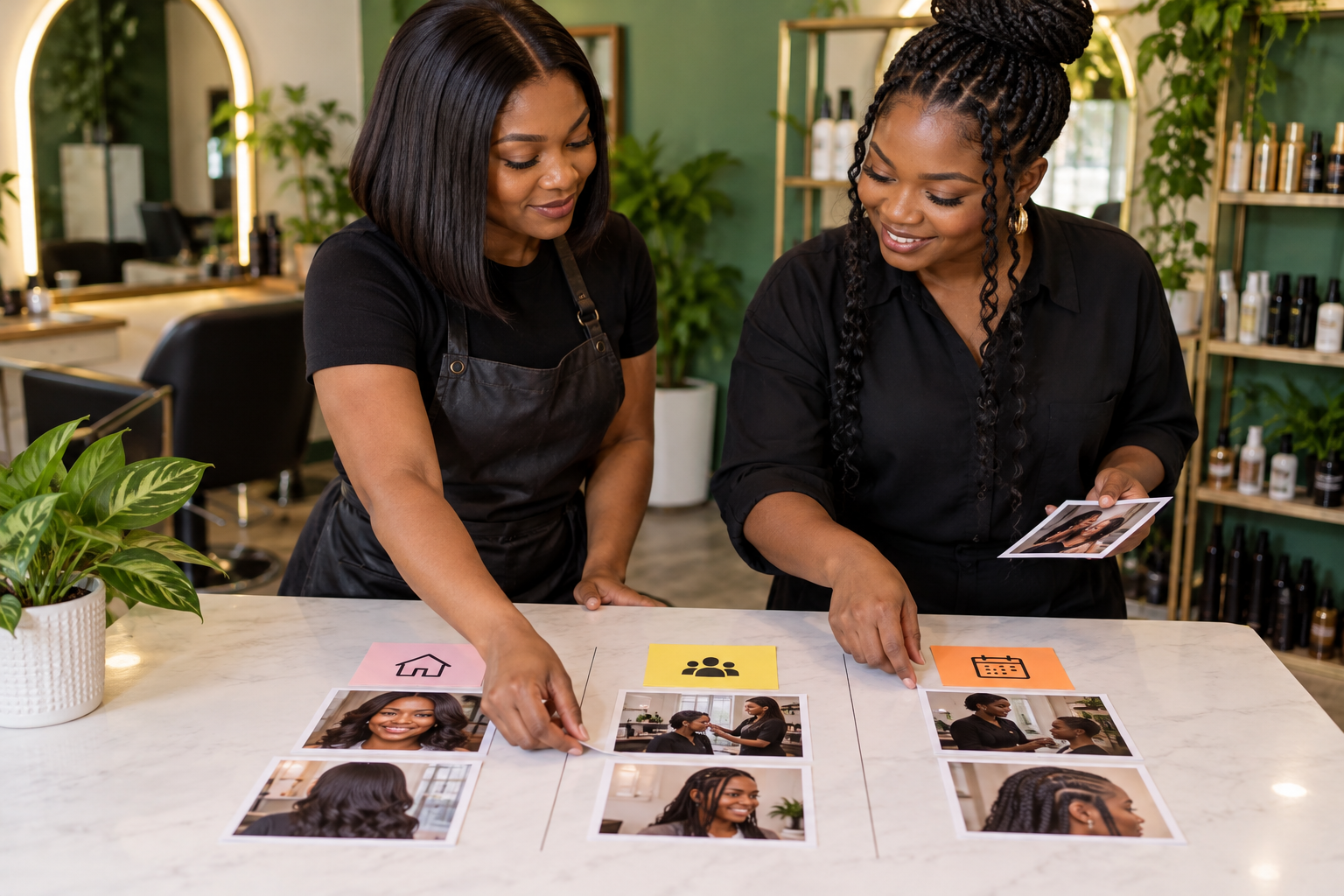
A salon example
Imagine a salon that offers natural-hair consultations, braiding and event styling. Its first pinned post could introduce the studio, location and appointment model. The second could show a consented braiding process with the preparation and finished style. The third could explain how to request an appointment and which details to send.
Three finished hairstyle photos may look attractive, but they leave operational questions unanswered. The stronger set combines identity, evidence and action.
Choose posts that work without hidden context
A pinned post should make sense to someone who has not followed the account for months. Remove references such as “as we said yesterday” unless the caption also explains the necessary background. Check that any price, phone number, location, schedule or booking route is still correct.
Use a cover image that remains understandable in the grid crop. Essential information should also appear in the caption, not only inside a small poster. Add accurate alt text for meaningful images so people using screen readers can understand the visual.
Do not choose by likes alone
A high-like post may be entertaining but unhelpful to a prospective customer. Compare candidates by the questions they answer:
- Does the post explain a core service?
- Does it show evidence or process honestly?
- Does it direct the right person to a current next step?
Engagement can be one signal, but the post’s usefulness on the profile is the deciding factor. A recent post with fewer likes may be the better introduction if it represents the current offer accurately.
Check the three posts as one set
Open your profile as a first-time visitor would and read only the pinned posts. If all three make the same claim, the set is wasting space. If they use unexplained jargon or assume the visitor already knows your business, the set is asking too much.
A useful test is whether someone can answer three questions after viewing the set: What does this business do? What helps me judge whether it fits my need? What should I do next? The answer does not need to appear in one post, and every visitor will not read all three, but the set should make the path obvious without becoming a hard sales pitch.
Pin and confirm in the mobile app
Open your own post in the Instagram app, tap the options menu in the top-right area and choose the pin option shown for the profile grid. Return to the profile and confirm that the intended three posts appear at the top. Interface labels can vary, so follow the wording shown in the current app.
When you unpin a post, you are changing its position, not deleting it. Confirm the final grid after every change, especially if the visual order matters across the three covers.
Review the row when the business changes
Set a review trigger rather than leaving the same posts pinned forever. Review after a service launch, location change, booking-process change, team change or major seasonal campaign. A quarterly check is also useful for stable businesses.
During the review, open every pinned caption and test its links or contact instructions. Replace the post if the information is outdated, the permission to use an image has changed or the service is no longer offered.

Use promotion only after the pinned row is accurate
Promotion may send more people to a profile, but it cannot correct unclear or outdated pinned posts. Make the profile useful first. Purchased engagement is also different from customer enquiries and organic demand.
When the profile accurately explains the service, review Cloutingo’s current Instagram-related services and terms. Choose only a listing whose description matches the campaign. If it does, you can open a Cloutingo account and place an order through the self-service panel.